How AI Alert Triage Helps a Lean SOC

By David Mundy, VP of Marketing, Tuskira
AI alert triage helps a lean SOC by investigating every alert the way an analyst would, closing the false positives with evidence, and handing people only the alerts that need judgment. For a team of three to ten analysts, that's the difference between working the queue and working the threats. This guide covers what AI triage does, where it helps a small team most, what it can't do, and how to roll it out without losing control.
Key takeaways
- Small SOCs don't fail for lack of tools. They fail because there isn't enough time to investigate every alert properly.
- AI triage helps most on high-volume, repetitive L1 work such as phishing reports, suspicious sign-ins and endpoint alerts.
- A verdict is only useful if it shows its reasoning. If an analyst has to redo the investigation to trust it, nothing was saved.
- Start with recommend-only, measure accuracy against your analysts, then widen what the agent can close on its own.
- Triage gets much better when it knows your environment, including which assets are exposed and what an attacker could reach from them.
Why lean SOC teams fall behind
A mid-market SOC usually runs on a handful of analysts covering a SIEM, an EDR, an identity provider, email security and a few cloud tools. Every one of those tools generates alerts, and most of those alerts are benign. The work isn't hard, but it's constant. An analyst opens the alert, pivots into three or four consoles, checks the user, the host and the IP, and decides. Multiply that by hundreds a day and the queue wins.
The usual fixes don't scale for a small team. Hiring is slow and expensive. Tuning suppresses noise but also hides the occasional real attack. SOAR playbooks help with well-understood cases, but someone has to build and maintain them, and that someone is the same overloaded analyst.
What AI alert triage does
An AI triage agent takes each alert as it arrives and works it like an L1 analyst.
- Forms a hypothesis about what the alert could mean.
- Pulls evidence from the tools that hold it, such as sign-in history from the identity provider, process trees from the EDR or message details from email security.
- Reaches a verdict of true positive, false positive or escalate, with a confidence score and, where it applies, the MITRE ATT&CK technique involved.
- Shows its reasoning so an analyst can open the case and check every step.
- Closes or routes the alert based on the autonomy you've allowed.
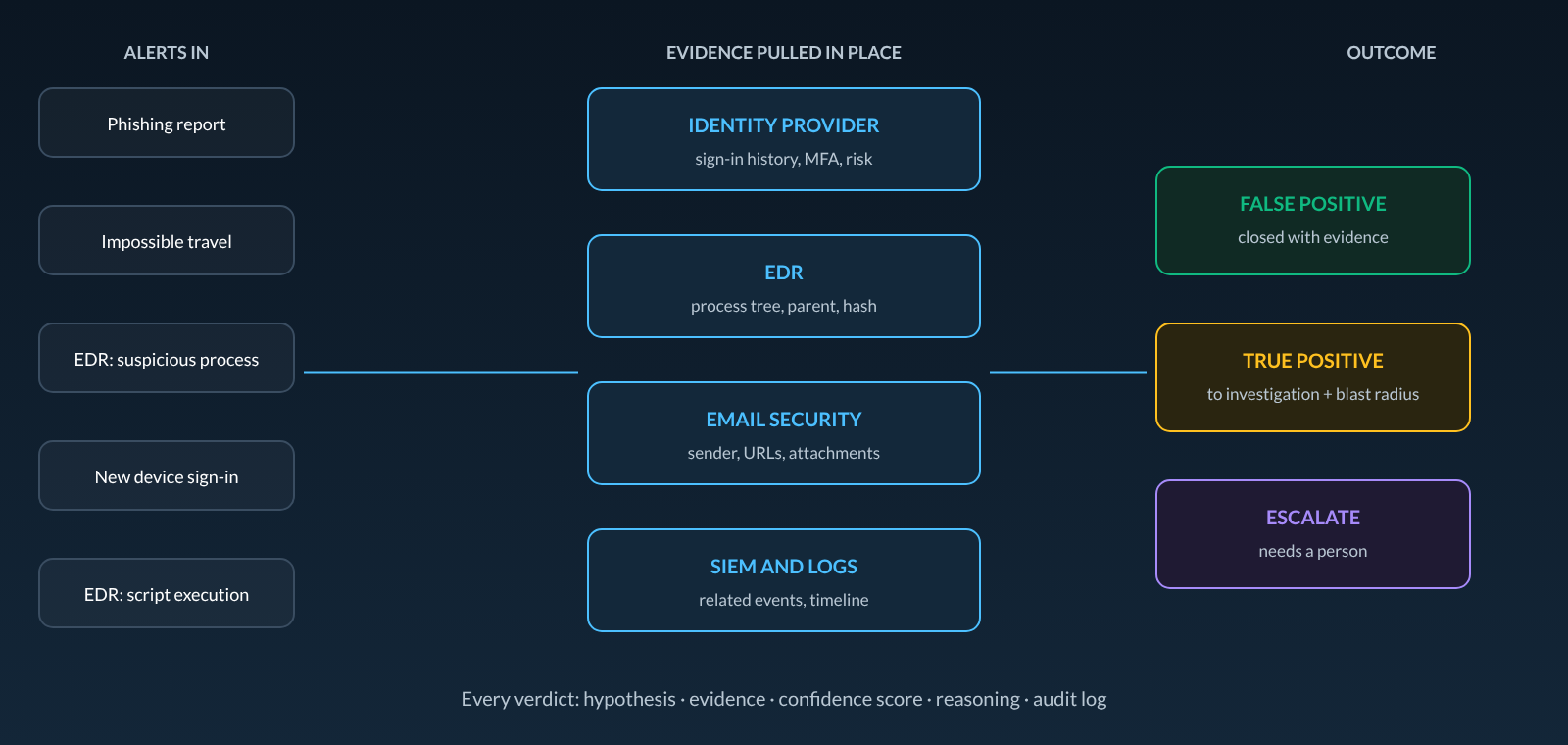
The good ones query your tools where the data lives, so there's no new data lake to build and no extra ingestion bill.
What evidence each alert type needs
Good triage depends on pulling the right evidence for each kind of alert. Here's what an agent should check for the alerts a lean SOC sees most.
| Alert type | Evidence the agent pulls | What separates real from benign |
|---|---|---|
| Reported phishing | Message trace, sender reputation, URL and attachment detonation results, other recipients | Whether anyone clicked, entered credentials or ran a payload |
| Unusual sign-in | Identity provider sign-in logs, device, MFA method, IP and VPN egress, the user's normal locations | MFA fatigue, a new device with token reuse, privilege changes right after sign-in |
| Suspicious process | EDR process tree, parent and child processes, command line, file hash reputation | Living-off-the-land binaries, encoded PowerShell, persistence, lateral movement |
| Cloud API anomaly | Cloud audit logs, role assumption chain, recent permission changes | New access keys, privilege escalation, unusual data access |
Where it helps a small team most
- Phishing reports. High volume, mostly benign, and easy to verify with the right evidence.
- Suspicious sign-ins. New locations, impossible travel and known-bad IPs, checked against the user's real history.
- Endpoint alerts. Process behavior checked against what's normal for that host and user.
- Cross-tool incidents. A phishing email that leads to a compromised endpoint and a stolen credential shows up as one investigation instead of three alerts in three queues.
- Nights and weekends. Alerts get investigated when no one is watching, and only the real ones page someone.
What AI triage can't do for you
- Fix bad detections. If a rule is noisy, triage will close the noise faster, but the rule still needs tuning.
- Replace judgment on high-impact calls. Isolating a domain controller or disabling an executive's account should still wait for a person.
- Make up for missing data. If a tool isn't connected, the agent can't pull evidence from it.
- Earn trust without proof. A verdict without visible reasoning will be ignored, and rightly so.
How to roll it out without losing control
1. Connect the tools behind your noisiest alerts
Start with the identity provider, EDR, email security and SIEM. That covers most L1 volume for a typical mid-market team.
2. Run in recommend-only mode
Let the agent investigate everything and recommend verdicts while your analysts keep deciding. Compare its verdicts with theirs for two to four weeks.
3. Let it close what it's proven on
Once accuracy is clear for a given alert type, let the agent close those false positives on its own. Keep everything else recommend-only.
4. Keep humans on high-impact actions
Containment that could disrupt the business should always wait for approval. Good platforms let you set this per action type, tie it to your existing role-based access, and make every automated action reversible.
5. Review the audit trail
Spot-check closed alerts every week. Every verdict should show what evidence was pulled and why the agent decided what it did.
What to measure
- Share of alerts closed without human review, and the accuracy of those closures.
- Time from alert to verdict, especially overnight, and its effect on mean time to detect (MTTD) and respond (MTTR).
- False positive rate of the alerts that still reach analysts.
- Analyst hours moved from L1 queue work to investigation and hunting.
- Escalation quality. How many escalated alerts turn out to be real.
Why context changes the verdict
Most AI triage tools only see the alert and the evidence around it. That's enough to decide whether an alert is real. It isn't enough to decide how urgent it is. A compromised laptop that has a path to your payment system is a different incident from one that doesn't. When triage runs on a model of your environment that knows which assets are exposed, which controls are in place and where an attacker could go next, the investigation can show the blast radius as soon as an alert turns real.
Where Tuskira fits
Tuskira is an AI SOC and agentic cyber defense platform. Its AI SOC agent, Iris, triages and investigates L1 and L2 alerts across the tools you already run and returns a verdict with a confidence score and the full reasoning. Benign alerts close. Real ones move to investigation, which maps the timeline and blast radius using the same model Tuskira uses for breach paths, and a response agent proposes containment through your existing controls. You set the autonomy limits, and every step is logged. Tuskira connects to 200+ tools out of the box. To compare options, see the best AI SOC platforms in 2026 and our eight evaluation criteria.
Frequently asked questions
Is AI alert triage worth it for a small SOC?
Usually yes, because small teams feel alert volume the most. The value comes from taking repetitive L1 work off a few analysts so they can focus on real threats.
Will AI triage replace my analysts?
No. It takes the repetitive L1 work off the queue. Analysts still make high-impact decisions, investigate complex incidents and tune detections.
How accurate is AI alert triage?
It varies by vendor and by alert type. Measure it yourself by running the agent in recommend-only mode on your own alerts and comparing its verdicts with your analysts' decisions.
Do I need a SIEM to use AI triage?
Not necessarily. Many platforms, including Tuskira, pull evidence directly from your EDR, identity, email and cloud tools as well as a SIEM.
How long does it take to set up?
Connecting the main alert sources is typically a matter of days. Building enough trust to let the agent close alerts on its own usually takes a few weeks of side-by-side comparison.
See Iris triage alerts from your own stack, or read Tuskira Answers for how the platform works.
The Best Zero-Day Response Platforms in 2026

What Is Threat Exposure Management? A 2026 Guide