Tuskira Open Sources the AI Agent Gateway
By the Tuskira Team · October 1, 2026
Most teams didn't decide to run a dozen AI agents. It happened one install at a time. A developer added Claude Code, someone else preferred Cursor, a platform engineer wrote a Python agent to triage tickets, and a CI job started opening pull requests. Each of those agents has its own model keys, its own list of MCP servers and its own idea of what it's allowed to do.
That holds up until someone asks a simple question. Which agents touched the production Jira project this week? What did the CI agent try to do that it shouldn't have? How much did we spend on tokens last month, and which agents spent it? The answers are spread across provider billing pages, local config files and logs on individual laptops.
Today we're releasing the Tuskira AI Agent Gateway as an open-source project to give teams one place to answer those questions and one place to set the rules. It runs in your environment, it doesn't need a Tuskira account, and the source is on GitHub under the Apache 2.0 license.
For developers, the short version
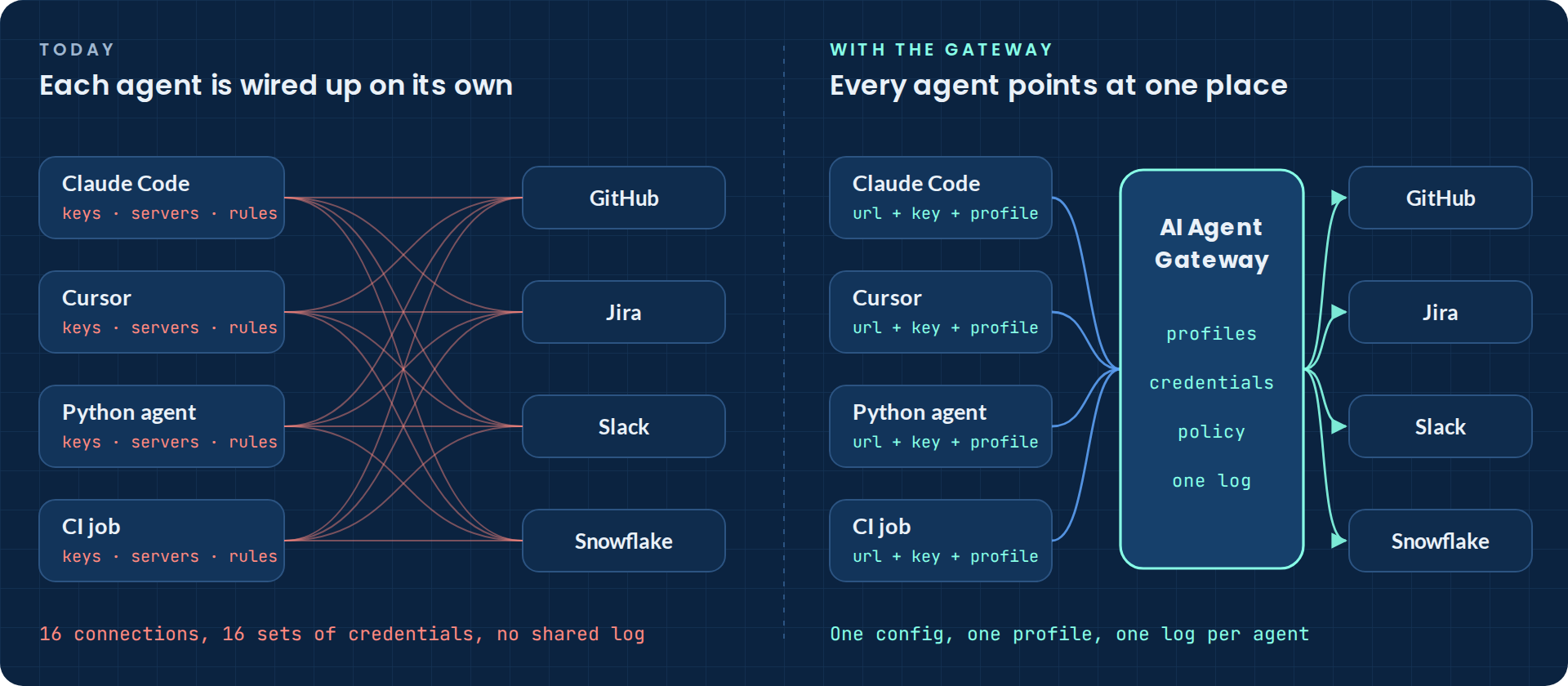
Every agent is wired up on its own
Look at how a single agent gets connected today. It needs an API key for each model provider. It needs a config entry for every MCP server it uses, and usually a credential for each of those servers too. Whatever rules govern what it may do live in that agent's own settings, if they live anywhere.
Multiply that by every agent on every laptop and runner and three problems show up. Credentials get copied into places nobody audits. There's no shared record of what agents called or what they cost. And the policy that says what an agent may do is written down somewhere, but nothing checks it at the moment the agent acts.
One gateway in the path
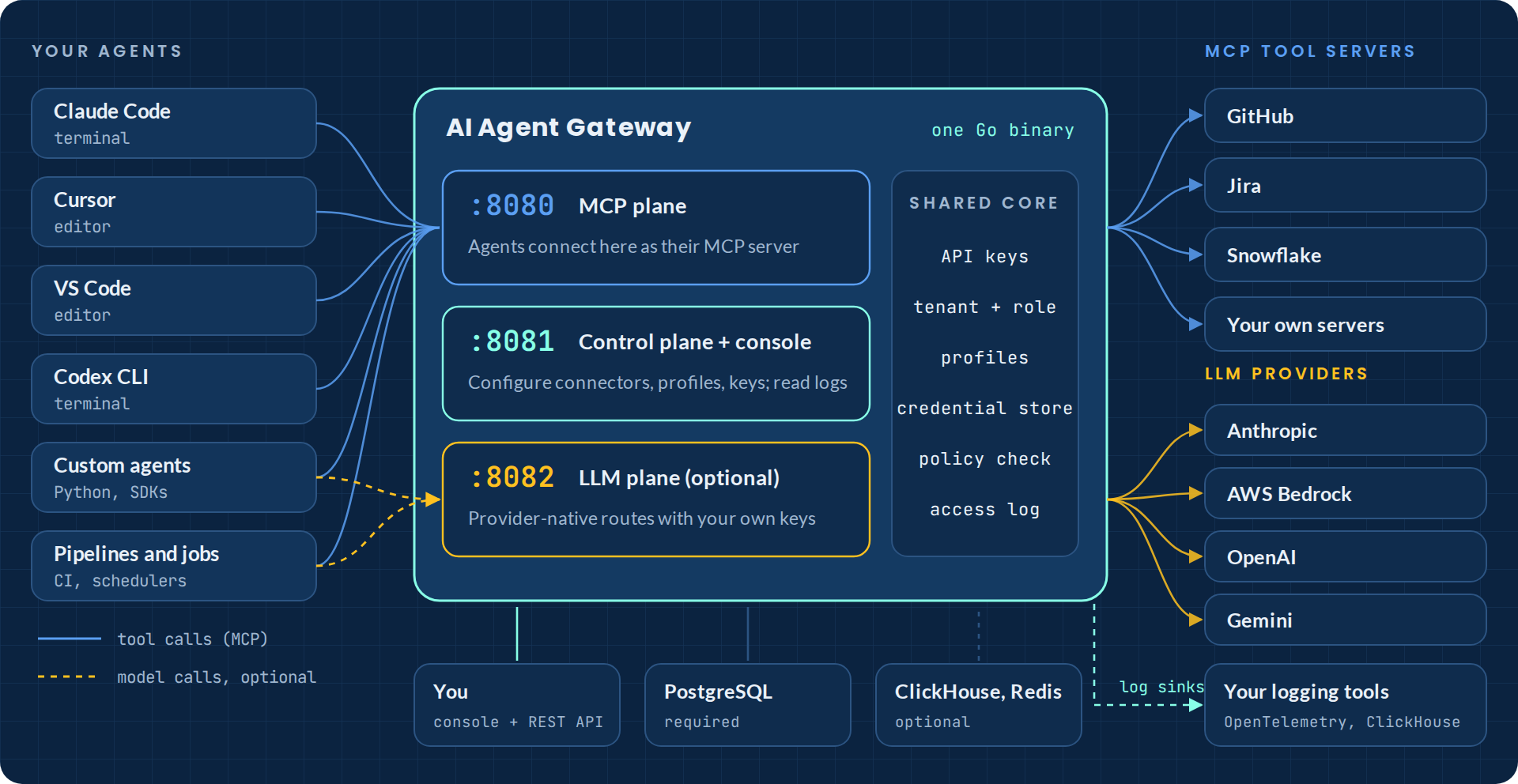
The gateway sits between your agents and everything they call, MCP tool servers and LLM providers alike. An agent registers it as its MCP server, and if you want model traffic covered too, you point the agent's SDK at it. From then on, tools, credentials and policy come from the gateway instead of from each agent's config.
It ships as one Go binary with three listeners, so each part can be exposed differently.
The endpoint agents talk to. It lists the tools each agent is allowed to see and checks every supported tool call before forwarding it.
Where you register MCP servers, define profiles, issue keys and read the logs, through a REST API or the built-in admin console.
Optional. Provider-native routes for Anthropic (direct or through AWS Bedrock), OpenAI and Gemini, using your own keys.
PostgreSQL is the only required dependency. ClickHouse adds the analytics dashboard and session timeline, and a Redis-compatible store lets the MCP plane run more than one replica.
What happens on a tool call
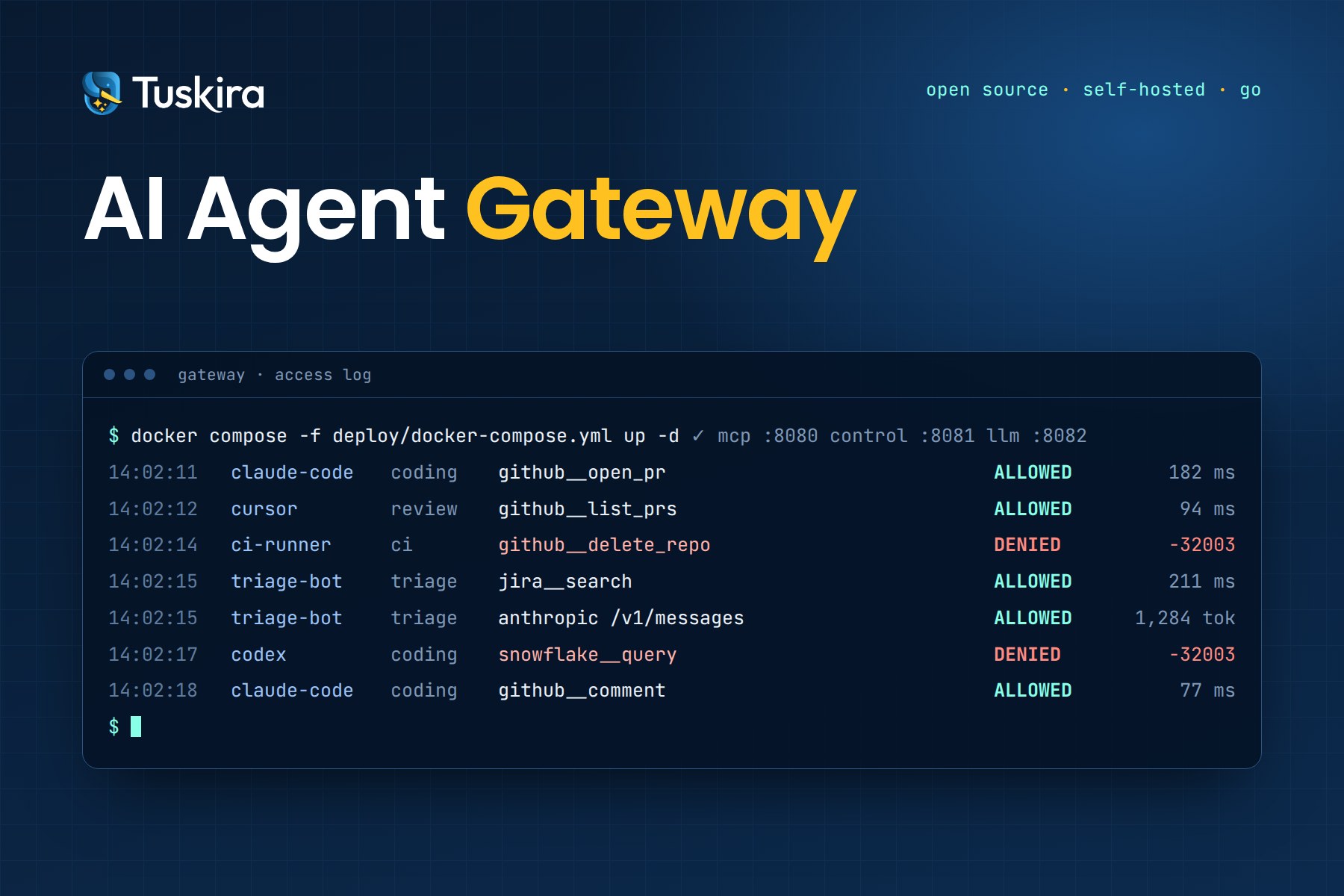
The easiest way to see how the gateway works is to follow one request. Say Claude Code, running under a profile called coding, asks to open a pull request on GitHub.
The agent sends the call to the MCP plane with two headers, its gateway key and its profile name. The gateway checks the key, which is tied to a tenant and a role, and applies any rate limit. Then it checks whether that profile is allowed to use that tool. If it isn't, the call stops there. The agent gets an error, the attempt is logged, and nothing reaches GitHub.
If the call is allowed, the gateway pulls the GitHub credential from its encrypted store, adds it to the outbound request and forwards the call. The agent never holds the token. When the response comes back, the gateway writes one log entry with the agent, the tool, the decision and the timing, and returns the result.
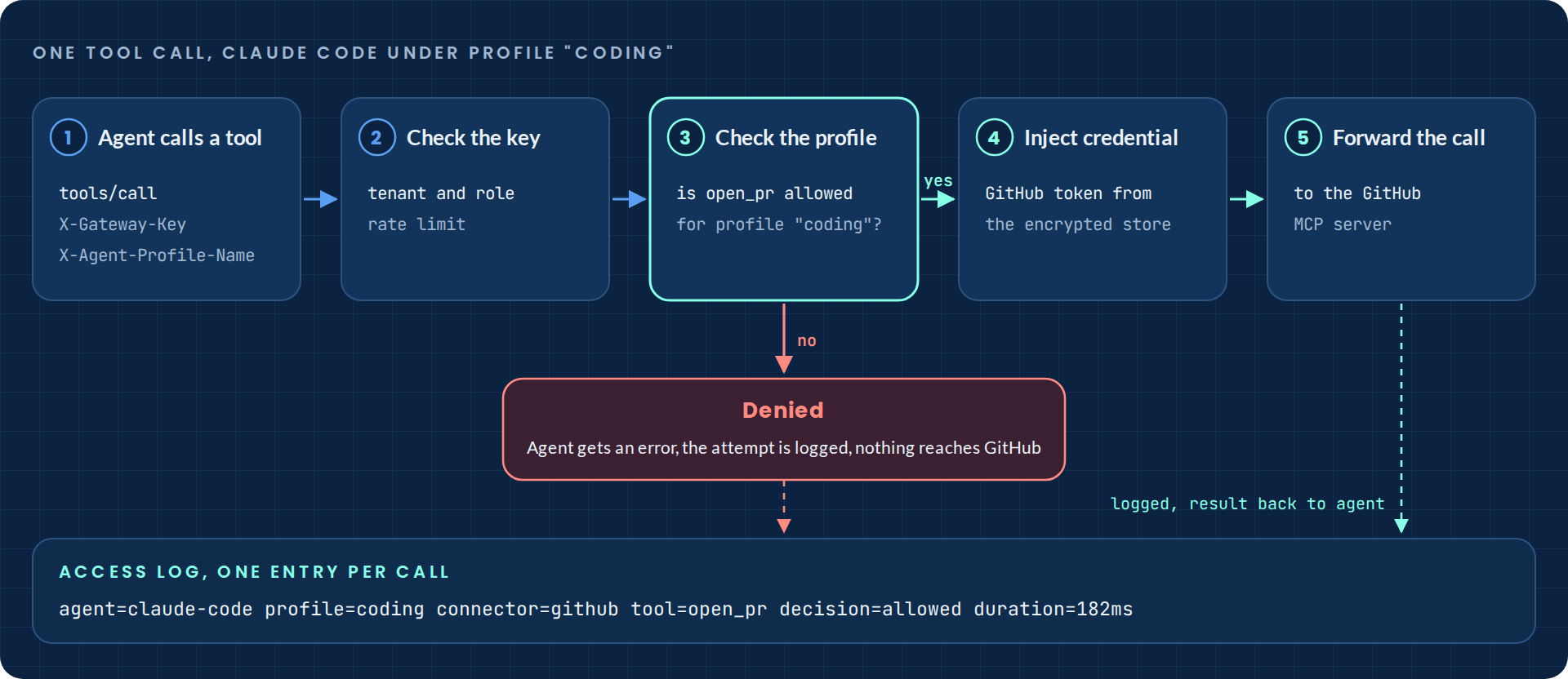
A denied call comes back to the agent as a normal JSON-RPC error, so the agent, and whoever is debugging it, can see exactly which tool and which profile were involved.
{
  "jsonrpc": "2.0", "id": 1,
  "error": {
    "code": -32003,
    "message": "tool not allowed by profile",
    "data": { "tool": "github__delete_repo", "profile": "read-only-analyst" }
  }
}
The profile is checked again at the moment the tool is called, in addition to filtering the list the agent sees. Hiding a tool is a convenience. Refusing the call is the control, and it holds even if an agent is talked into trying a tool it was never shown.
Profiles decide what each agent can use
You register an MCP server once, as a connector, with one credential. Profiles then choose which of its tools each kind of agent can use. The same GitHub connector can give an interactive coding agent read and write tools, give a review agent read and comment tools, and give a CI job the single tool it needs.
Profiles live on the control plane, so you can manage them in the console or script them against the REST API.
# choose which tools the profile allows
curl -X PUT http://localhost:8081/api/v1/profiles/$PROFILE_ID/tools \
  -H "Authorization: Bearer $GATEWAY_KEY" -H "Content-Type: application/json" \
  -d '{"tools": [
        {"connector_id": "'$CONNECTOR_ID'", "tool_name": "search"},
        {"connector_id": "'$CONNECTOR_ID'", "tool_name": "get_issue"}
      ]}'

# bind an agent's key to that profile so it can't pick its own
curl -X PATCH http://localhost:8081/api/v1/api-keys/$KEY_ID \
  -H "Authorization: Bearer $GATEWAY_KEY" -H "Content-Type: application/json" \
  -d '{"profile_id": "'$PROFILE_ID'"}'
Bind each agent's key to its profile and the choice is enforced on every call. If a CI key leaks, the damage is limited to what that profile allows, and the log shows every time it was used. Changing what an agent may do means editing one profile, and every agent using it picks up the change on its next call.
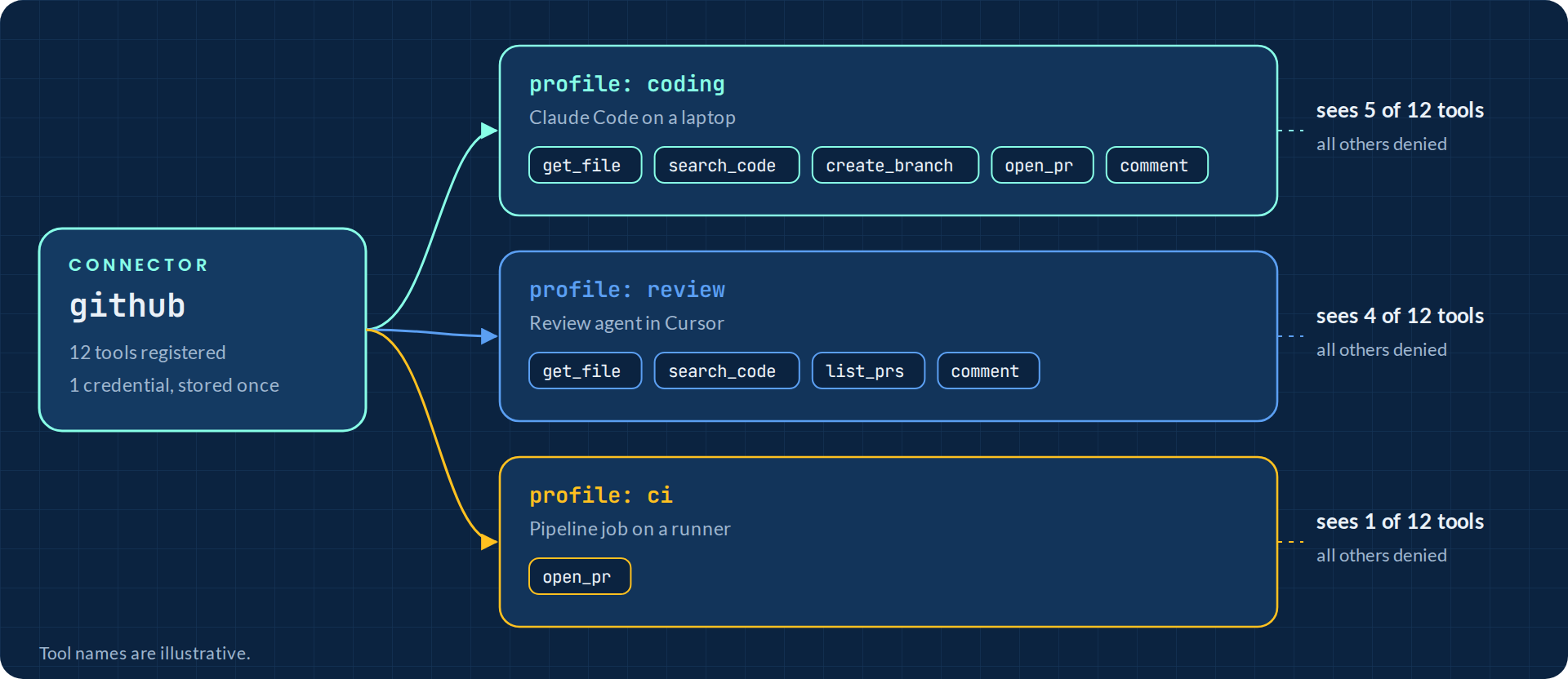
Profiles cover more than tools. Prompts and resources from every connected server come through under one namespace, and profiles can carry skills and commands that agents receive natively over MCP.
Models through one endpoint
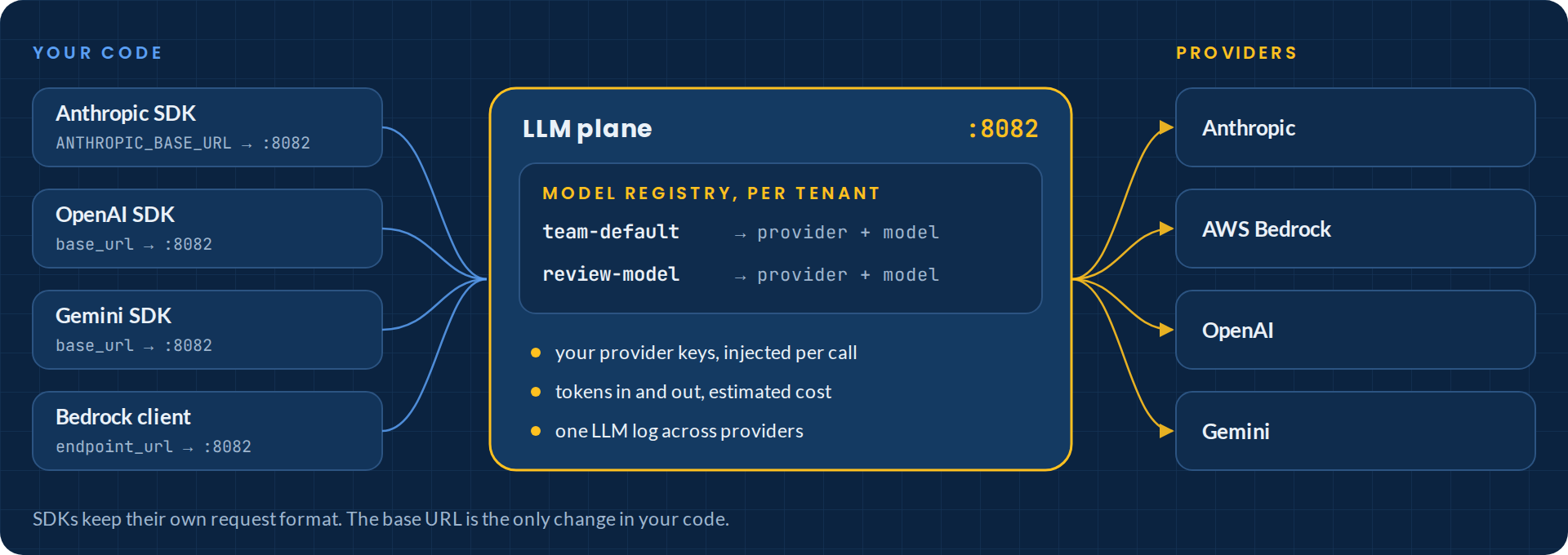
On the LLM plane, the gateway speaks each provider's own API. The Anthropic SDK still calls /v1/messages, and the OpenAI and Gemini SDKs send the requests they always send. You change the base URL and nothing else.
# Anthropic SDK, Claude Code and anything else that honors the variable
export ANTHROPIC_BASE_URL=http://localhost:8082
# OpenAI, Gemini and Bedrock clients take the same idea through their
# base_url / endpoint_url settings, on the /openai/, /gemini/ and /model/ routes
The gateway adds your provider key, forwards the call and records tokens in and out with an estimated cost.
A model registry lets each tenant give models its own names. Agents ask for the registered name, and you decide which provider and model it resolves to. Moving a team to a different model means changing one registry entry instead of every agent's config.
What you can see
Every call through the gateway is recorded. The admin console has access logs for tool calls, LLM logs with token counts and estimated cost, an analytics overview and a session timeline. The same events can go to OpenTelemetry or ClickHouse, so you can query them with the tools you already use.
Out of the box, the demo stack stores request and response bodies so the console can show them, capped at 1 MiB each. If your policy says bodies shouldn't be kept, one setting turns that off.
Built to run inside your boundary
The gateway doesn't call home. There's no Tuskira account, no hosted control plane and no usage reporting, so your configuration, policies and logs stay where you put them.
A few defaults follow from that. Backend credentials are encrypted at rest and injected per request. API keys are scoped to a tenant and a role, and console users are kept separate from the keys programs use. Outbound connections to loopback, private and link-local addresses are refused unless you allow them, and the cloud metadata address is always blocked, so a misconfigured connector can't be used to reach other workloads on your network.
Why we made it open source
We built the gateway for our own platform, which runs agents against customer environments under tight control. Once it existed, it was clear the problem wasn't specific to us. Every team adopting agents needs the same baseline, and software that sits in the path of every agent call is something you should be able to read line by line.
AI agents are moving into production faster than organizations can manage them. Teams are wiring agents to models and tools independently, without a shared view. Visibility and control should be basic infrastructure, so we're making it open source.
Piyush Sharma, CEO and Co-founder, Tuskira
The code is licensed under Apache 2.0. Issues and pull requests are welcome, and CONTRIBUTING.md explains how to add a store backend, a log sink or a provider.
Where it is today
This is a pre-1.0 alpha. The current release is v0.4.0, and APIs and configuration may still change between minor versions. Expect rough edges and file issues when you hit them. It runs on macOS and Linux (Windows through WSL2 is untested), it ships Docker Compose and Kubernetes manifests, and a Helm chart is planned. docs/architecture.md lists exactly what's in the current release.
Try it in a few minutes
You'll need Docker with the Compose plugin, curl, and ports 8080 to 8082 free.
git clone https://github.com/Tuskira/ai-agent-gateway.git
cd ai-agent-gateway
docker compose -f deploy/docker-compose.yml up --build -d

# wait for the control plane, then check it
curl localhost:8081/api/v1/health

# create the tenant and your first admin API key (printed once)
docker compose -f deploy/docker-compose.yml exec gateway /gateway bootstrap-key
Then point your agent at the gateway as its MCP server. For Claude Code, that's one entry in .mcp.json.
{
  "mcpServers": {
    "gateway": {
      "type": "http",
      "url": "http://localhost:8080/mcp",
      "headers": {
        "X-Gateway-Key": "gk_...",
        "X-Agent-Profile-Name": "coding"
      }
    }
  }
}
The repository has 13 worked examples covering Claude Code, Cursor, VS Code, Codex CLI, a Python agent, profiles, credentials, observability and Kubernetes. Start with examples/01-quickstart.
Run it in your environment
Source, install guide and 13 worked examples are on GitHub. Docs live at community.tuskira.ai.
View on GitHubRead the docsProduct page
Tuskira Named in the 2026 Gartner® Emerging Tech Impact Radar: CSP Infrastructure and Operations
Tuskira Named in the 2026 Gartner® Research Note, Agentic Security: Preemptive Exposure Management